
Why AI Writes Should Not Go Straight to the Database: QTable's Preview → Confirm → Apply
Once AI can change business data, the dangerous failure is no longer a bad sentence. It is a stale, unauthorized, or misunderstood decision becoming a durable business fact. This article walks through QTable's Action Plan, version checks, permission revalidation, and ChangeSet audit path.
If AI is only giving advice in a chat window, a wrong answer can usually be corrected before anything important happens.
The situation changes once the same system can reassign tasks, move deadlines, change status, create dependencies, or create new records. A mistake is no longer just inaccurate text. It can become part of the business state.
The harder problem is not simply that models make mistakes. People make mistakes too. The harder problem is that the world in which an AI made a decision may no longer be the world in which that decision is eventually written.
Consider a very ordinary timeline.
At 10:02, an agent reads Task A. It is still “In progress,” its record version is 12, and the agent proposes moving the deadline to next Monday.
At 10:03, a teammate edits the same task and changes both its status and deadline. The record becomes version 13.
At 10:04, the user returns to the AI panel, reviews the older proposal, and confirms it.
If “confirmed” means “execute unconditionally,” a proposal built against version 12 can overwrite work that already exists in version 13.
That is why QTable does not treat an AI write as “the model returned JSON, so update the database.”
The write path I want is deliberately stricter:
Preview → Confirm → Apply
Those words sound like UI steps. The important part is the system boundary underneath them.
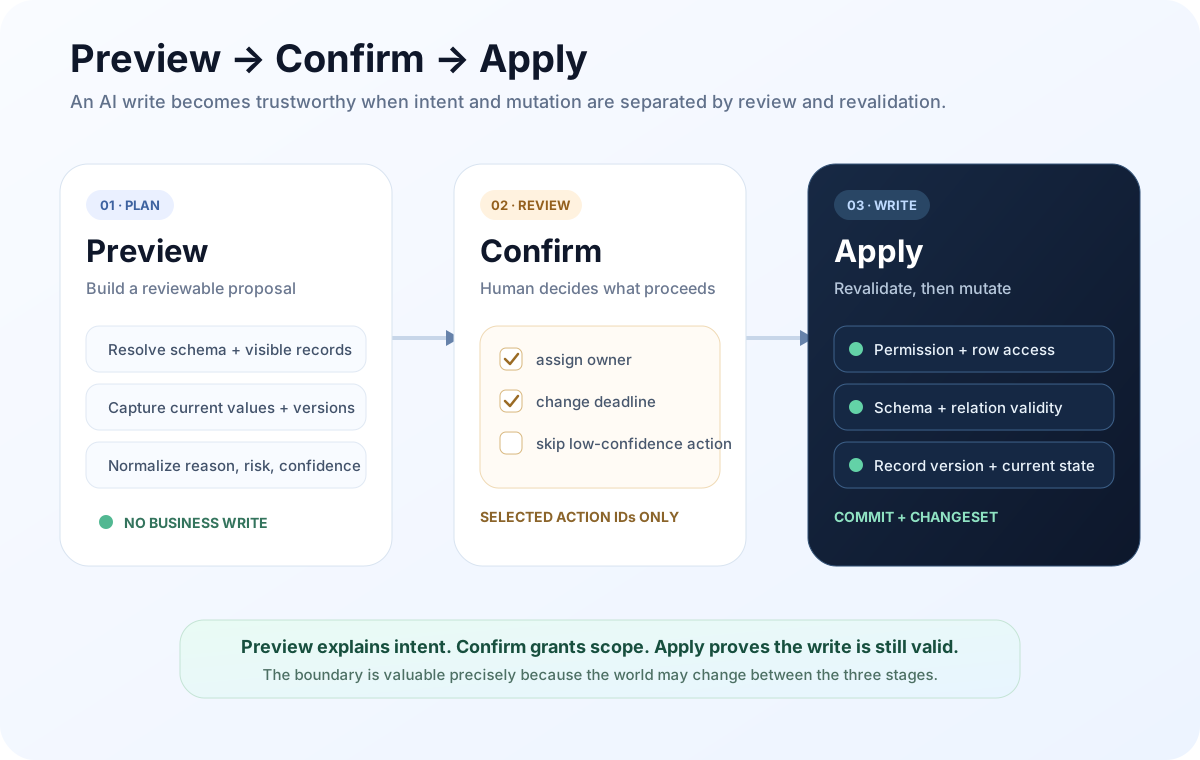
Preview is not “show the result first”; it is plan generation without a business write
Many AI products have something called preview, but it is often just a presentation layer. The model has already decided what to change, the UI shows a card, and clicking a button sends the same payload to the backend.
That is not the boundary I mean.
In QTable, the current ai_action_plan.py service turns a recommendation into a structured Action Plan. During Preview it resolves the diagnosis, target tables, field definitions, records visible to the current user, and the record versions that exist at that moment. Candidate actions are normalized into operations the domain layer can validate.
The current contract supports owner assignment, priority, deadline, status, tags, dependencies, and task creation. The request models live in app/schemas/ai_action_plan.py.
The important property is simple: Preview does not mutate the business records.
The repository test suite in tests/test_ai_action_plan.py explicitly checks this. After Preview, record data and versions are unchanged and no business ChangeSet has been created, while a persisted AiActionPlanBatch exists with status previewed.
That stored Preview is not just prose. It carries the state needed for a meaningful later Apply, including things such as:
- the target Table and Record;
- action type and suggested value;
- current value and proposed value;
- record version observed during Preview;
- relevant field types, members, and relation targets;
- reason, risk warnings, and confidence;
- an
actionIdthat makes later selection explicit.
This is what turns “the model thinks this would help” into “the system has a reviewable, checkable candidate change.”
If Preview is only a nice card and does not preserve the state it was based on, Confirm has nothing durable to confirm.
Confirm is about write scope, not trust in the model
It is easy to describe Confirm as: the user clicked approve, therefore the AI may execute.
That is too broad.
For an Action Plan, Confirm is better understood as human selection over a concrete set of actions. The current Apply request accepts a planId and a list of actionIds, so a user can approve only part of a plan instead of granting all-or-nothing authority.
Imagine a plan with four actions:
- assign Task A to Bob;
- move Task A to Monday;
- raise Task B to high priority;
- create a new regression-test task.
A user may agree with the first three and not want the fourth one created yet.
A useful confirmation boundary needs to preserve that choice.
There is also an implementation detail worth being precise about. The Action Plan service does not need a method literally named confirm() just to make the conceptual model look symmetrical. In this path, confirmation is represented by the selected actionIds supplied to Apply. Separately, QTable’s general AI Runtime has a pending-confirmation mechanism and /runtime/confirm path for resuming tool execution that has been stopped at a confirmation gate.
The mechanisms are not identical, but the principle is shared: side effects should not cross the boundary merely because a model expressed an intention.
The world may have changed by the time Apply begins
This is the part of the write path that is easiest to underestimate.
A user may spend seconds or minutes reviewing a Preview. They may switch back to the table to check details. During that time, another person, an automation, an API client, or another agent can keep working on the same records.
So Confirm can say:
“I approve the intention I just reviewed.”
It cannot prove:
“That intention is still valid against the current state.”
Those are different claims.
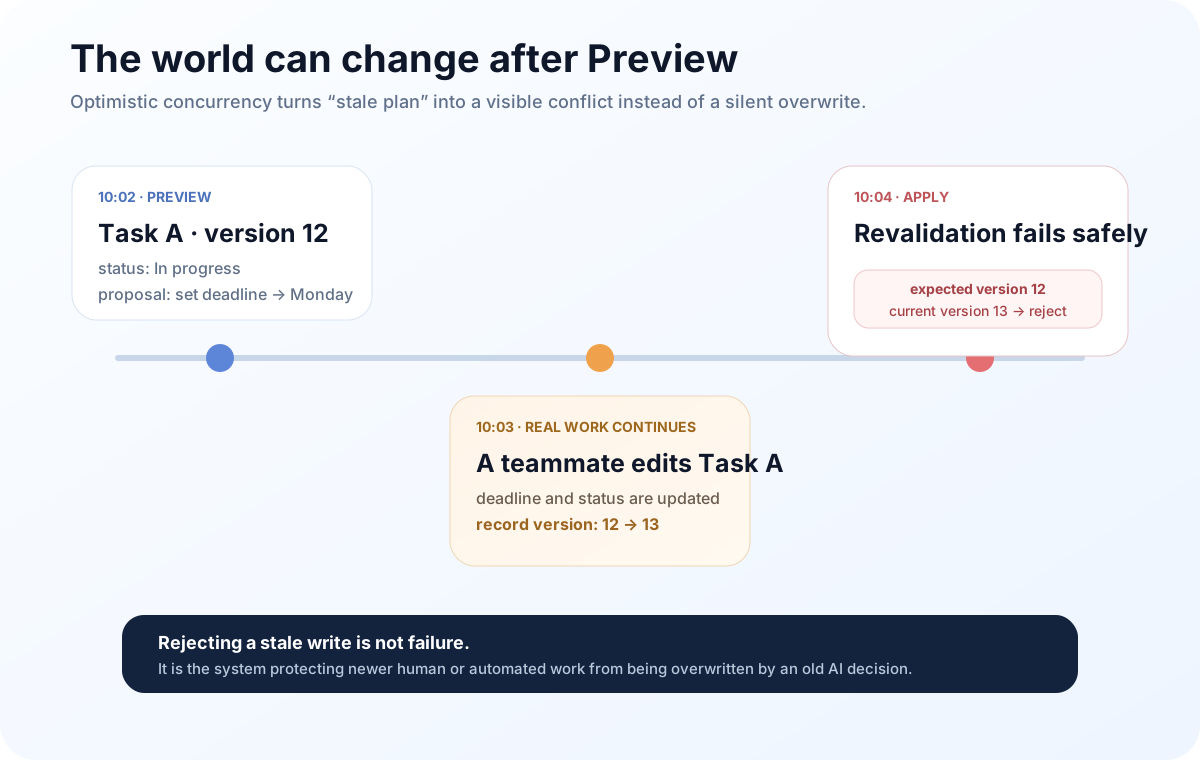
QTable’s current TableRecord carries a monotonic version. Preview records that version. Apply locks and reads the target record again; if the current version no longer matches the Preview version, the write is rejected and the Action Plan must be regenerated.
The service error is intentionally plain:
Record changed after preview; regenerate the Action Plan before applying.
I like that failure mode.
It does not try to be clever and merge an AI decision whose context is now stale. It does not silently overwrite newer business state. It admits something important: the plan has expired.
In a real work system, that kind of conservatism is often more reliable than automatic recovery.
Apply does not execute Preview; it proves Preview is still legal
From the UI, Apply may look like the final button.
On the server, it should do much more than replay the old proposal.
The current AiActionPlanService.apply rechecks the target state rather than trusting the results from Preview. The current boundary includes checks such as:
| What Apply revalidates | Why Preview cannot be trusted indefinitely |
|---|---|
| Target Table still exists | It may have been deleted or moved |
| User still has update permission | Permission may have changed |
| Row-level access still allows the record | The row may no longer be visible |
| Assignee is still a valid Workspace member with access | Membership or access may have changed |
| Relation targets are still accessible | Linked records can disappear or become hidden |
| Field still exists with the same type | Schema can change |
| Select / multi-select values are still valid | Options can be removed or replaced |
| Record version still matches | Prevents overwriting work done after Preview |
The key point is that Apply does not ask the model again.
Whether the write is allowed is decided by current business state and server-side rules.
That is why an AI Action Plan is better thought of as a change proposal with preconditions, not as a batch of database commands.
Conflicts should be exposed, not hidden
In conventional CRUD systems it is tempting to treat “write success rate” as an obvious good.
For an agent, trying too hard to make every confirmed write succeed can be dangerous.
If, after Preview:
- another person edits the record;
- a field changes from
selectto another type; - a suggested owner leaves the Workspace;
- a relation target is no longer visible;
- the user’s permission is reduced;
then blocking Apply is the correct result.
QTable’s Action Plan tests cover several of these boundaries: concurrent record changes block Apply, hidden rows cannot enter Preview, non-Workspace assignees are rejected, visible dependency cycles are rejected, and a stale diagnosis cannot generate a new Action Plan.
Those tests matter more to me than a demo where the model successfully updates five tasks. They verify the rules that make it reasonable to let an agent enter a business system at all.
A successful write still needs evidence
Safety does not end when the database transaction commits.
If someone asks three days later:
“Why did Bob become the owner of this task?”
the system should be able to answer at least:
- who initiated the change;
- whether the actor was a person, AI, or automation;
- which Action Plan it came from;
- the value before the change;
- the value after the change;
- which fields changed;
- how the record version moved.
QTable’s change_history.py provides the ChangeSet / ChangeItem layer for that. A successful AI Action Plan Apply records a ChangeSet with actor_type=“ai” and operation=“ai_action_apply”, including before/after data, version before/after, changed fields, and a trace id.
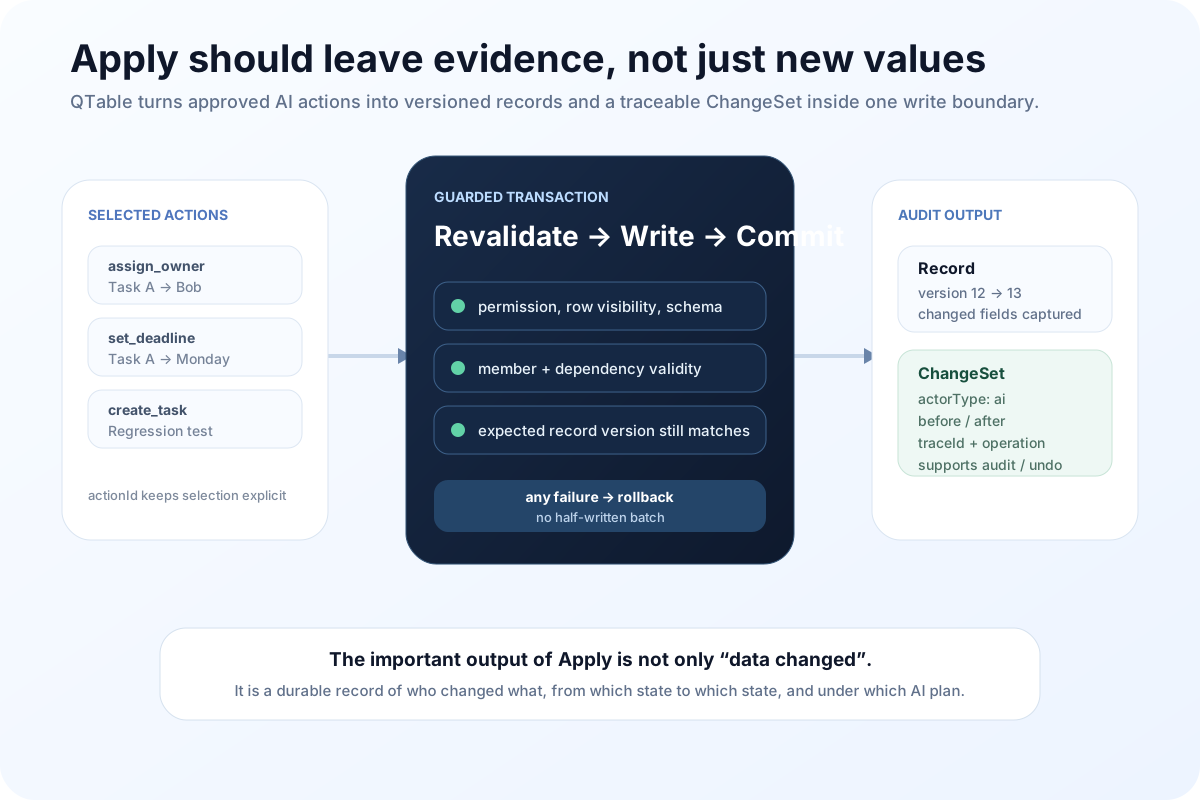
That history also makes Undo possible.
But Undo is a safety net, not a substitute for Preview and Confirm.
If an agent mistakenly edits hundreds of records, technical reversibility does not erase everything that may have happened in between. People may have seen the wrong state. Notifications may have fired. Downstream automation may have reacted. Access-sensitive information may already have been exposed.
The better order is still: prevent bad writes before commit, while keeping recovery after commit.
Partial Apply and idempotency are boring details that matter
Confirmation is not always “execute the whole plan once.”
A user may apply two actions now and come back for the third later. A network retry may send the same Apply request twice.
Without careful handling, those cases create strange behavior: duplicate tasks, repeated updates, or a retry falsely conflicting with the version change caused by the first successful request.
QTable tracks which actionId values have already been applied. Repeating the same selection can return idempotently, while a partially applied batch can continue with the remaining actions. Batch state distinguishes states such as previewed, partially_applied, applied, and apply failure.
None of that sounds especially “AI.”
It is exactly the sort of engineering that determines whether an AI feature survives outside a demo.
Why I do not want an AI-only write shortcut
There is a tempting implementation when building AI features:
the model already produced a target field and a new value, so add an AI-specific mutation, validate a few parameters, and update the database directly.
It is fast to build.
It also creates a second rule system:
- human operations use one set of permissions and validation;
- AI operations use another set of “model-friendly” shortcuts;
- automation may eventually have a third path.
Soon the same Record behaves differently depending on where a mutation came from.
QTable is moving in the opposite direction. An AI Action Plan eventually comes back to the same Workspace / Table / Record / Permission / Relation / Version / ChangeSet domain objects.
AI can become better at proposing work. It should not get a privileged lane around the rules of the product.
What Preview → Confirm → Apply actually protects
This path protects more than data.
It protects the responsibility boundary between a person and an agent.
Preview forces the system to make the intention concrete: what will change, why, and with what risk.
Confirm lets the user define scope: which of those actions are acceptable now.
Apply returns to reality: under the permissions, schema, relations, and versions that exist at this moment, are those actions still valid?
None of the stages can replace the others.
Preview without Apply-time revalidation asks the user to confirm a plan that may already be stale.
Confirm without a structured Preview gives the user vague promises such as “AI will optimize the project,” which are impossible to review precisely.
Apply plus Undo, without a write boundary beforehand, is just using rollback to compensate for missing control.
That is why I do not see Preview → Confirm → Apply as a UI preference. Once AI can modify business data, it becomes an execution boundary worth treating as part of the architecture.
The next article will move one step earlier in the chain: what Context was the Preview built from in the first place?
Safe execution answers “how may the AI write?” The Context Engine has to answer the other half: how does the AI know which Workspace, project, tables, records, and user-specific business context it is actually operating inside?
QTable is open source
If the data model, AI workflow, or open-source engineering discussed here interests you, read the code, open an issue, or contribute directly.