
An Agent Is Not a System Administrator: Why QTable Keeps Agent Permissions Below the Current User
Once AI can read tables, analyze work, call Tools, and mutate business data, one of the most important security boundaries is not a special permission system for agents. It is making sure every agent action remains bounded by the current user. This article walks through QTable's current identity flow, Workspace / Item permissions, row permissions, Skill authorization, relation sanitization, and Action Plan Apply checks.
The previous article ended with a boundary that matters even more once an Agent enters the product:
the View may change, but the authorization boundary must not change with it.
Suppose a user is only a Viewer in a Workspace.
They can inspect project progress, but they cannot modify tasks.
Now they open the AI Assistant and say:
“Reassign every overdue task to me and move the deadlines out by a week.”
A model can understand that perfectly well.
It may find the right tasks, build a good plan, and select the right Tools.
The system should still reject the unauthorized write.
Not because the model is uniquely untrustworthy, and not because AI needs an entirely separate security model.
The simpler reason is that the Agent is acting for the current user.
If the person cannot perform an action directly in the product, natural language plus a model should not turn that action into something they are suddenly allowed to do.
That leads to one of the permission rules I care about most in an AI-native work system:
The Agent’s authority should be capped by the current user’s authority, not by everything the backend is technically capable of doing.
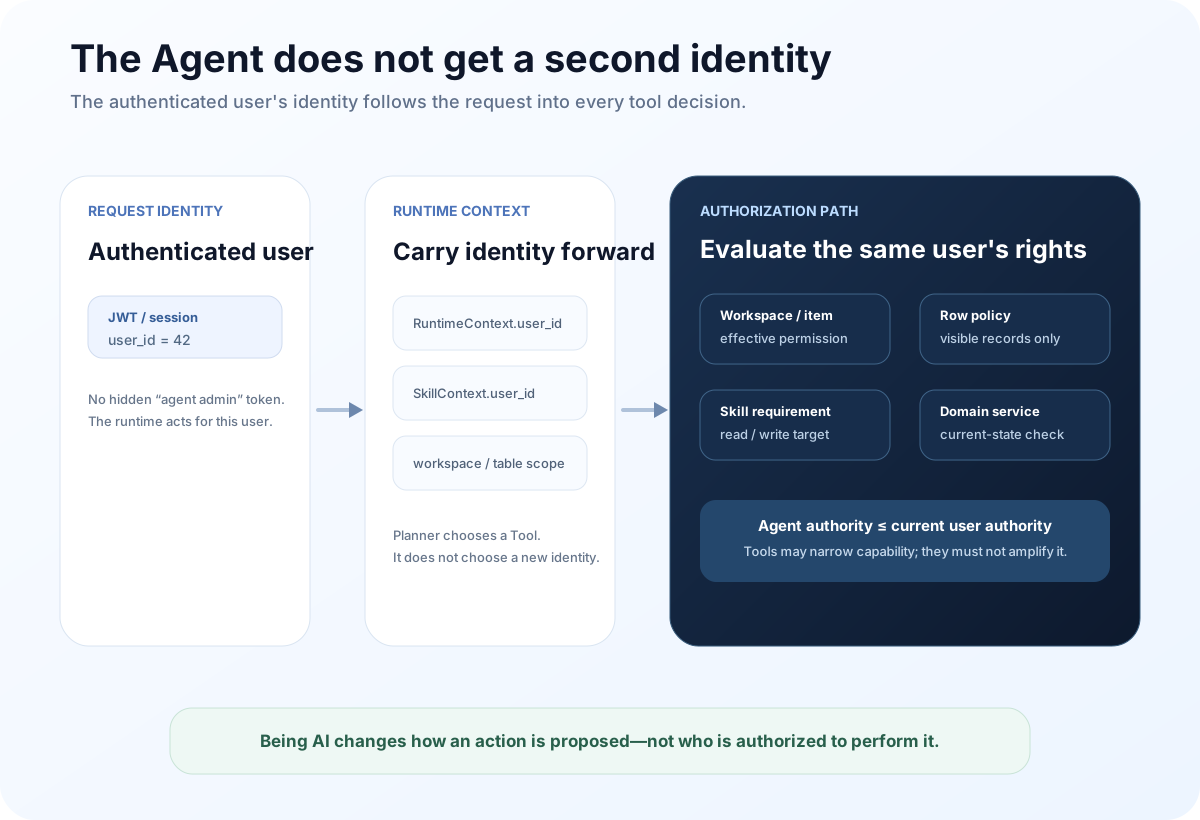
The first thing an Agent inherits is identity, not power
QTable’s current authenticated request path resolves a user_id from the access token and loads the corresponding User.
When an AI request enters the runtime, that same user_id becomes part of RuntimeContext.
When a Skill is actually executed, the runtime carries the same user into SkillExecutionContext.
That sounds mundane, but it establishes the starting point for every later permission decision.
A Tool should not receive:
“this is an AI request, so execute it as an internal administrator.”
It should receive:
“user 42 made this request, and the Agent is now invoking this Skill on behalf of user 42.”
Those two designs have very different security properties.
In the first one, the AI Runtime becomes a new permission principal. If the model can reach a Tool, that Tool may end up with more power than the person who initiated the request.
In the second one, AI is a new interaction and orchestration layer. Authorization still belongs to the existing User, Workspace, Table, and Record model.
This is why I do not like the pattern of giving an Agent one broad service account and then asking a prompt to “only do things the user is allowed to do.”
A prompt is not an authorization system.
The model should not be the final authority on whether an action is permitted.
QTable permissions are a narrowing chain, not a boolean
Real business permissions are rarely just “allowed” or “not allowed.”
Several layers currently contribute to what a QTable user may finally do.
Workspace membership establishes a baseline role.
Today, Owner maps to manage, Editor maps to edit, and Viewer maps to read.
A specific Workspace Item may then carry an explicit permission override. If the current Item has no override, resolution walks up the parent chain. Only when no override exists in that chain does it fall back to the Workspace role.
That produces the effective permission for the Item.
The current permission ladder is:
read → update → edit → manage
These are ordered capability levels, not four unrelated switches.
Row permissions then narrow the set of Records that remain visible inside a Table.
Finally, the Tool and domain layers still need to check whether the requested operation itself is permitted.
So authorization behaves more like intersection than addition.
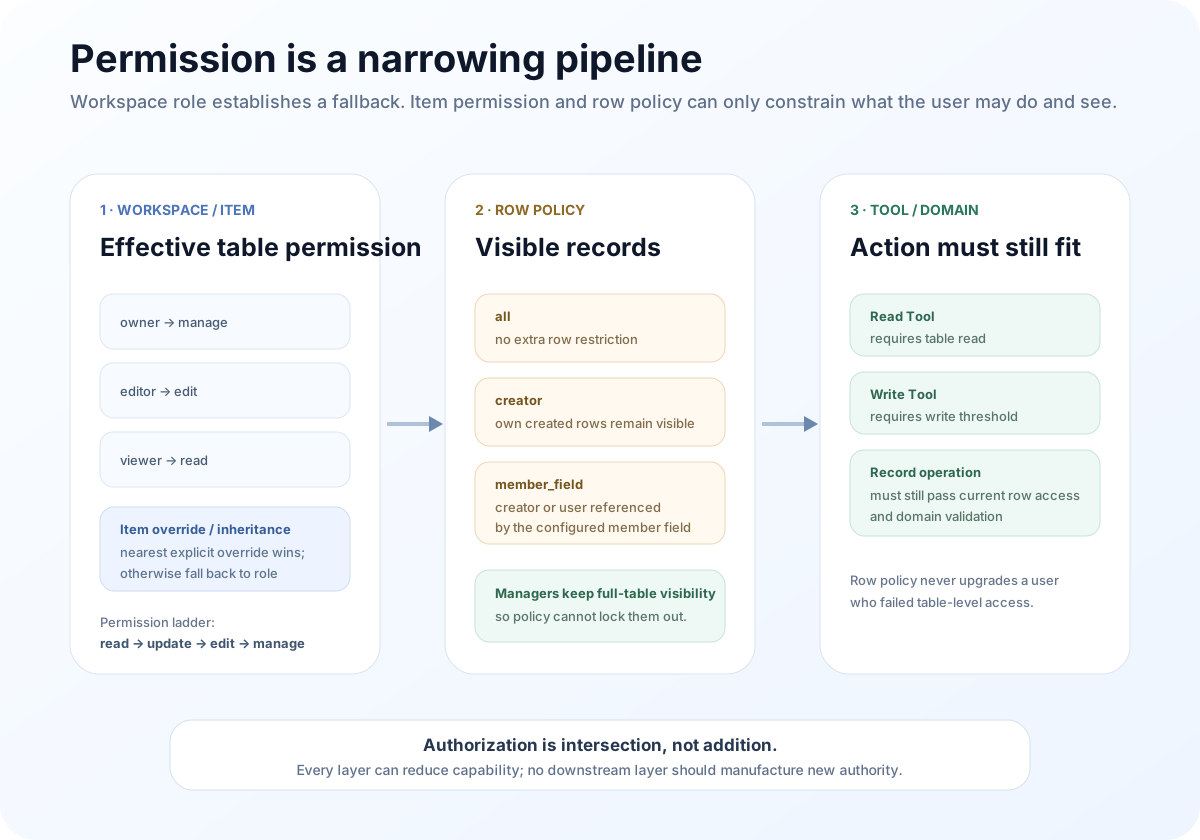
The comment at the top of QTable’s current row-permission service states this principle plainly:
row-level permissions only restrict an existing table permission; they never grant access that the higher layer denied.
I find that more useful than simply saying “the product supports RBAC.”
Row permissions answer a narrower question: which facts inside this Table may this user see?
QTable currently has three row-permission modes.
all adds no extra row restriction.
creator lets normal users see Records they created.
member_field uses a configured Member Field as a visibility rule. The creator remains visible, and Records that reference the current user in that Member Field are visible as well.
A user with manage permission retains full-table visibility so a restrictive rule cannot accidentally lock managers out of the Table.
There are two implementation details here that matter more than the mode names.
First, an invalid or stale member_field rule fails closed for non-managers.
If the policy points at a Member Field that no longer exists, the runtime does not say, “the rule is broken, so show everything.”
Those Records stay inaccessible.
Second, a Member Field currently used by row permissions cannot simply be deleted or converted to another type.
The Schema layer refuses the change until the row-permission rule is changed first.
That prevents an innocent-looking schema edit from silently changing authorization semantics.
QTableUI follows the same boundary at the experience layer. The Row Permission panel supports the same all, creator, and member_field modes, and only a user with canManage may save the policy.
But a disabled button is never authorization.
The UI is convenience. The server must remain the authority because any client can bypass the interface and send a request directly.
Filtering the source row is not enough; Relations can leak hidden data too
One of the easiest places to miss row-level authorization is a Relation.
Suppose Alice can see Task A.
Task A contains a relation with the raw value:
[target-alice, target-bob]
Alice may read target-alice but not target-bob.
If the backend checks only whether Task A is visible and returns the Relation value unchanged, then target-bob has already leaked information even if none of Bob’s fields are returned.
The identifier alone confirms that another hidden object exists.
That matters even more for AI.
A normal UI may expose one stray ID.
A model is good at combining small clues: a hidden Record identifier, a member name, an earlier conversation, an aggregate count. Several small leaks can become one larger inference.
QTable’s current row-permission layer therefore includes relation sanitization.
For each Relation Field, it resolves the target Table’s permission scope as well.
When a target Record is hidden, its ID is removed from a multi-value Relation. A hidden single Relation becomes null.
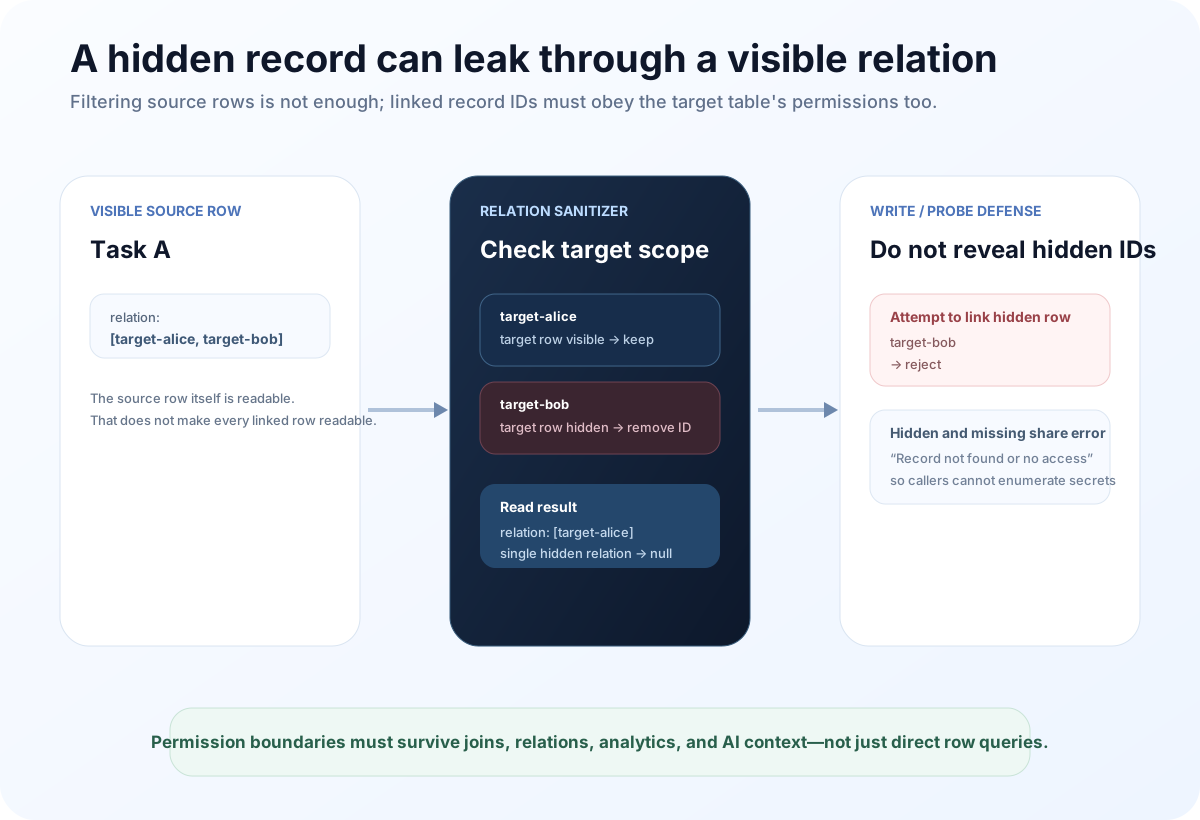
Writes follow the same rule.
If a user tries to create a Relation to a target Record they cannot access, the operation is rejected.
There is another useful detail in require_record_access: a missing Record and an inaccessible Record intentionally return the same error:
Record not found or no access
That prevents callers from probing identifiers to discover which hidden Records exist.
It is a small implementation detail, but this is the sort of detail that separates a real authorization boundary from a role selector in the settings UI.
AI should receive only authorized data before reasoning begins
A common AI permission design focuses on the last step:
check permissions when the model tries to write.
That is necessary, but it is not enough.
If Bob’s private tasks are invisible to Alice, but the backend first sends the entire Table into the model and only prevents writes afterward, the leak has already happened.
The model has already seen the data.
It may even repeat it in an answer.
Permission filtering therefore has to happen before the Context reaches the model.
In QTable’s current fallback AI path, _load_table_snapshot first resolves the authenticated user’s effective permission for every requested Table.
No Read permission means no snapshot.
With Read permission, the Store is passed through row filtering and Relation sanitization.
Only after that does the fallback path apply its 100-Record prompt limit.
The order matters.
It is not “take the first 100 rows from the whole Table, then remove whatever the user should not see.”
It is “construct the user’s visible set, then sample from that set.”
The Context Engine follows the same direction.
The recordCount discussed in article four is permission-aware on the database backend. If row-level restrictions apply, it counts only the Records visible to that user.
Task Split, Workload Estimation, Structured Output, and other AI features that load Table Context have tests asserting that sample rows come only from the current user’s visible scope.
Task Management analytics such as overdue tasks, project progress, workload, blocking tasks, and delay prediction also propagate the authenticated user_id into their data queries.
So “the Agent cannot see more” cannot be implemented as a final response filter.
It has to be true from the first moment business data enters the AI pipeline.
A Tool needs a permission contract of its own
The previous article argued that a larger Tool catalog does not automatically create a better Agent.
The same applies to permissions.
If a runtime only has a list of “functions the model can call,” it is easy to confuse “the function exists” with “this user may execute it.”
QTable’s Skill Metadata includes a permissions contract.
A Table-schema reader declares a Table Read requirement.
Record creation and task-record creation declare Table Write requirements.
Before SkillRuntime invokes a handler, the call passes through SkillAuthorizer.
The generic authorizer verifies that the Execution Context has a User, resolves the target Table, calculates that user’s effective permission, and compares it with the Skill requirement.
Only after authorization passes does the runtime move on to input validation, confirmation handling, and the actual handler.
I especially like the ordering here:
Authorization comes before Confirmation.
An unauthorized user should not receive a dialog asking:
“Do you confirm this privileged operation?”
They should receive Forbidden.
Confirmation expresses intent. It does not create authority.
In the current implementation, a Skill Metadata write requirement maps to the Table’s edit threshold in the generic authorizer. That convention may become more granular over time, but the important part is that the execution layer is not asking the Planner to guess whether a user “seems allowed to write.”
Records created by AI still need a human business identity
There is another subtle identity question:
who is the creator of a Record created by an Agent?
If every AI-created Record is stored with “AI” as the creator, the creator row-permission mode quickly stops making sense.
A user asks the Agent to create ten tasks, then cannot see them because “AI created them.”
QTable’s current Create Record Skill uses the authenticated user as the creator on the database path:
created_by_user_id = current user_id
That gives us a useful distinction.
The action source may be AI.
The business identity is still the user the Agent represents.
Audit history can record that the actor type was AI, while ownership, row permissions, user-scoped history, and other business rules still know which person authorized the operation.
“Executed by AI” and “executed for Alice” should be able to be true at the same time.
Confirmation must never become a long-lived authorization ticket
This is where several earlier articles meet.
Context can be cached.
An Action Plan can be Previewed.
A user can Confirm it.
None of those things should become a durable permission grant.
Imagine Alice has Update permission at 10:00.
The Agent generates a plan.
At 10:03, an administrator reduces Alice to Read.
At 10:04, Alice returns to the old Preview and confirms it.
If Apply checks only:
“this plan was valid three minutes ago, and Alice confirmed it,”
then the system has turned stale permission into an execution credential.
QTable’s current Action Plan Apply path does not work that way.
Apply reloads the Plan under user_id + plan_id, so a user cannot apply someone else’s plan.
It then recalculates the current effective permission for every affected Table and requires Update permission.
Every Record being modified is checked again with require_record_access.
Relation targets, member assignments, field definitions, and record versions are revalidated as part of the write path as well.
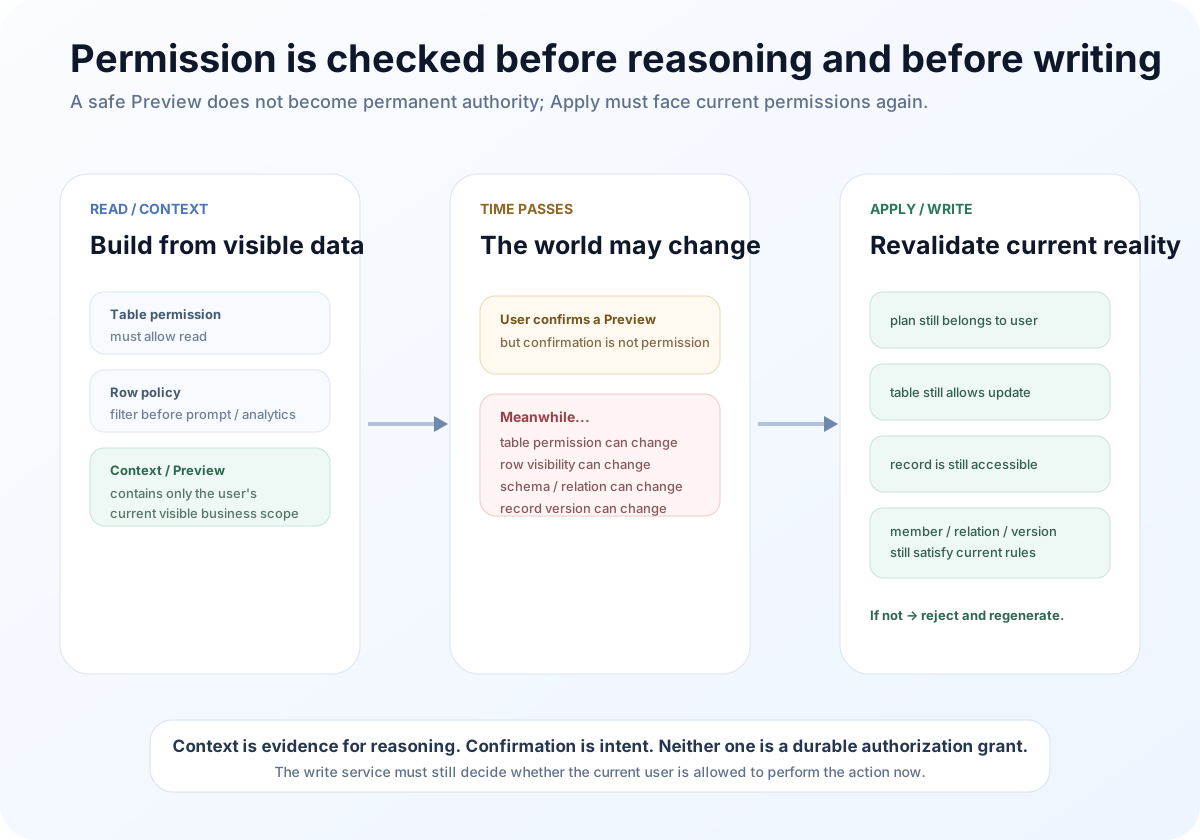
This is the same class of problem as Record Version from article three.
Data changes.
Permissions change too.
Something that was legal during Preview is not guaranteed to remain legal during Apply.
“The model never saw it” needs tests, not confidence
Permission bugs in AI systems often hide in side paths.
The main page may correctly filter Records while a fallback analyzer reads the full Store.
The Context Builder may calculate its own count.
An analytics Tool may use a separate query path.
Relations, dashboards, historical learning, and caches can each introduce another read surface.
That is why I think permission tests should be framed around concrete information boundaries.
QTable already has several tests worth keeping.
With Alice and Bob in the same Table under Creator row permissions:
the AI fallback snapshot may contain only Alice’s rows;
Context Builder’s Record count must reflect Alice’s visible scope;
Describe Table’s sample rows may contain only Alice’s rows;
Task Split, Workload, and Structured Output contexts may sample only Alice-visible data;
Task Management analytics must not include Bob’s private tasks in Alice’s overdue, progress, workload, blocker, or delay results;
a visible source Relation must not expose Bob’s hidden target ID;
AI-generated historical results and cache keys are isolated per user, so Alice cannot retrieve Bob’s Task Split or Workload result.
Those tests are more meaningful than the sentence “the Agent respects permissions.”
They define a concrete invariant:
which information must never enter another user’s AI context.
The current permission model still has edges that need to converge
This article should not imply that the authorization layer is finished.
There are several boundaries I would keep working on.
First, the generic Skill Authorizer currently enforces mainly Table permissions.
The permission contract can represent resources such as table, workspace, skill, and marketplace, but the current generic authorizer skips non-Table requirements.
The contract is therefore broader than the common enforcement path.
Workspace and Skill scope should eventually converge into the same policy-enforcement layer instead of relying on individual handlers to fill in the gaps.
Second, row permissions are currently a database-backend capability.
AI snapshots and Context Builder apply Table ACL plus row policy on the database path. The legacy file backend deliberately preserves its older behavior and does not pretend to have database ACL semantics.
That boundary should stay explicit.
For a multi-user Agent deployment, the database-backed permission model should be treated as the security baseline.
Third, similar permission checks currently appear in several execution paths.
Context Builder checks them.
The AI fallback loader checks them.
Skill Authorizer checks them.
Action Plan Apply checks them again.
Some repetition is correct because read-time filtering and write-time revalidation are supposed to happen at different moments.
But the way a policy decision is represented, logged, and explained can still be unified further.
I would rather have one stable authorization contract consumed by these layers than reimplement slightly different permission logic every time a new Agent workflow is added.
Fourth, authorization decisions deserve better observability.
QTable already has traces, Tool events, and ChangeSets.
A useful next step is to preserve safe audit metadata explaining:
why a Step was Forbidden;
which effective Table permission was calculated;
which row policy excluded a Record;
why Apply was rejected after a permission change.
That information must not leak hidden data back to the user, but it is valuable for security audits and administrator debugging.
AI-native should not mean AI-privileged
There is a dangerous shortcut that appears naturally when AI features are built quickly.
Normal UI operations use REST or GraphQL permissions.
AI reads the database directly because “it needs more context.”
Normal writes go through row permissions.
The Agent uses an internal service account because “it needs to complete the workflow.”
Normal users cannot see certain Relations.
The model context receives the full dataset because “a fuller answer is more useful.”
These shortcuts make an AI demo look smooth.
They also create two different products underneath:
the system the user is allowed to see;
and the system the AI can actually see and mutate.
Once those diverge, trust becomes very difficult to recover.
I prefer a much simpler rule for Agent authority:
Agent Authority ≤ Current User Authority
A stricter form is even more useful:
Executable capability = Current User Permission ∩ Tool Permission ∩ Row Scope ∩ Current Business Constraints
An Agent may have less power.
A workflow may be read-only.
A Workspace may disable a Skill.
A dangerous write may require confirmation.
All of those narrow capability.
But “because this is AI” should never push the ceiling upward.
Trust comes from using the same rules
If a user cannot see a Record in Grid, it should not appear in AI Context.
If a user cannot edit a Table manually, a Tool should not bypass that boundary.
If a Relation target is hidden, the Agent should not receive its identifier.
If permission is removed after Preview, Confirm should not resurrect the old right.
If AI creates a Record, the system should still know which user it represented.
Together, those behaviors are what “Agent permissions do not exceed the current user” actually means.
It is not one if role == viewer check.
It requires identity, Context, Tools, Relations, analytics, mutations, and audit history to share the same authorization boundary.
That is the main idea I want to keep from this article:
An Agent should not become a superuser inside the product. It should become a new interface to the current user’s existing capabilities.
Article seven was about what AI is allowed to do.
The next article will shift from runtime security to open-source engineering: once an AI-native system can execute code, call Tools, and process business data, why should anyone trust that a released binary, image, or package actually came from the source code they reviewed?
That leads into CI, SBOMs, provenance, and software supply-chain trust.
QTable is open source
If the data model, AI workflow, or open-source engineering discussed here interests you, read the code, open an issue, or contribute directly.