
Context Is Not More Prompt Stuffing: How QTable Builds Real Business Context for Agents
Once an agent enters a business system, the first problem is not how much the model can remember. It is how the system knows who the user is, which Workspace, Table, View and conversation are active, and which permission boundary makes that context valid. This article walks through QTable's current Context Engine: scope, compression, caching, persistence and runtime injection.
The previous article ended with a question:
What Context was the Preview built from in the first place?
It sounds less exciting than “an AI agent that executes work,” but it is a more basic problem.
A user in QTable says:
“Can you tell me why this project is late?”
A person usually has no trouble with “this project.” We know which Workspace we opened, which table is on screen, which View we are looking at, what we discussed a few minutes ago, and who we are.
A model does not know any of that unless the product makes it explicit.
If the backend sends only that sentence, the model is not really solving a project-management problem yet. It is first trying to resolve a pile of hidden references:
Which project?
Which table should be inspected?
Which rows may this user see?
Does the earlier discussion about “backend work” still apply?
Is the user looking at Kanban, Gantt, or another View?
Which Session, Workflow, or Agent does this request belong to?
That is why I have become wary of the phrase “give the model more context.”
The real problem is not volume. It is whether the context has identity, scope, boundaries, and coordinates.
QTable’s Context Engine exists to establish those coordinates before the agent starts reasoning.
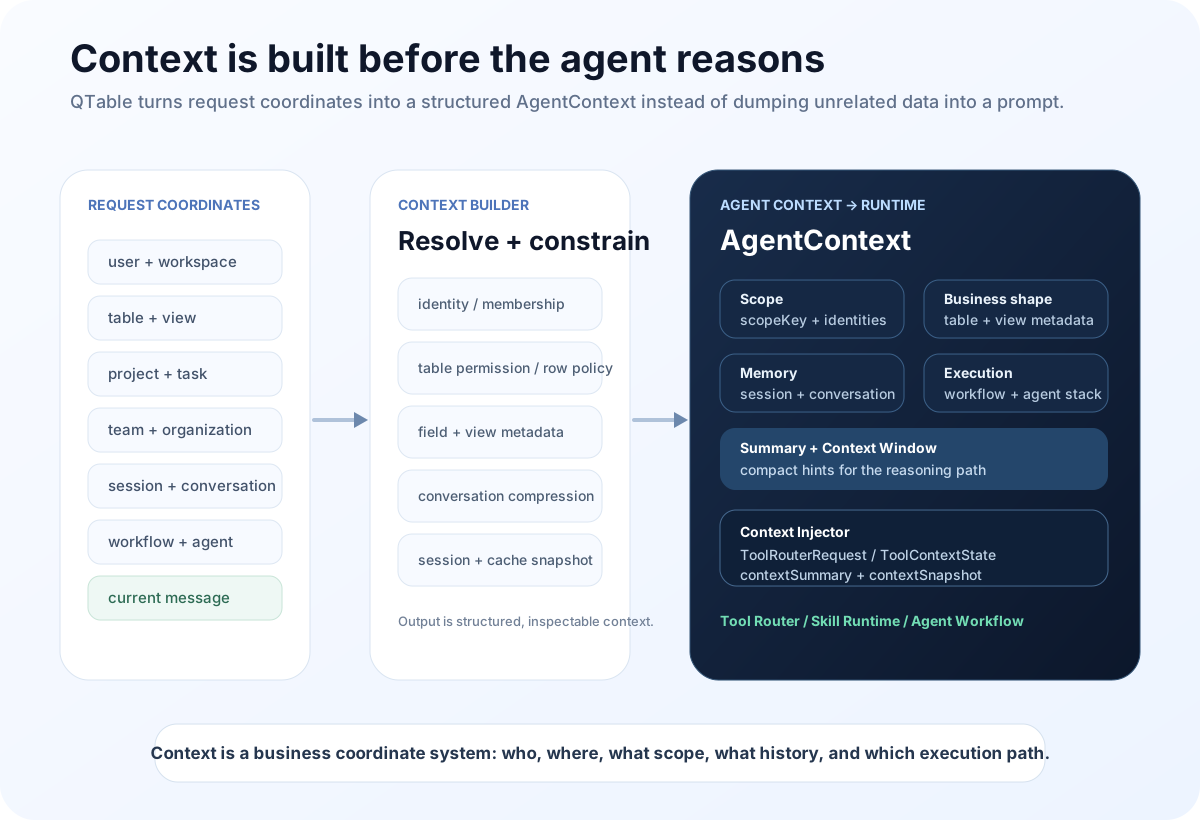
Context starts as coordinates, not as prose
The core context models currently live in app/context_engine/models.py.
The input contract is called ContextBuildInput.
It is not a preassembled prompt. It is a structured set of coordinates:
- user;
- session / conversation;
- workspace;
- project;
- table;
- view;
- task;
- team;
- organization;
- workflow;
- agent;
- current message;
- locale, timezone, and additional metadata.
Those IDs look mundane, but they solve an important product problem: the model does not need to guess where it is.
In QTable’s current AI Chat and Agent paths, app/api/ai.py extracts these coordinates from the request and headers, builds a ContextBuildInput, and sends it through the Context Engine before Tool Router execution.
The PM Agent follows the same direction. app/api/pm_agent.py carries workspace, project, table, view, task, team and organization coordinates into the builder, then passes the resulting AgentContext into the workflow.
That matters because Context stops being a private variable inside one prompt template.
It becomes infrastructure shared by different AI entry points.
Decide whose context this is before deciding what goes into it
One of the most dangerous context failures is not missing information. It is mixing information from the wrong scope.
For example:
- table metadata from Workspace A leaks into Workspace B;
- a previous conversation keeps influencing a new session;
- fields seen by an administrator appear in a normal member’s context;
- two users accidentally share the same cached snapshot.
So the Context Builder does not begin with “fetch more data.” It begins by establishing a scopeKey.
The current implementation lives in app/context_engine/repository.py. Scope is built from user, workspace, and session. If an explicit session is absent, conversation is used; only after that does the key fall back to anonymous.
In other words, Context is not a global cache object.
It belongs to a user, a Workspace, and a session boundary.
The cache key then adds tableIds, viewId, projectId, taskId, teamId, organizationId, workflowId, agentId, plus part of the current message, and hashes the result.
The point is not merely better cache hit rates. The key is also a guard against treating two superficially similar requests as the same context.
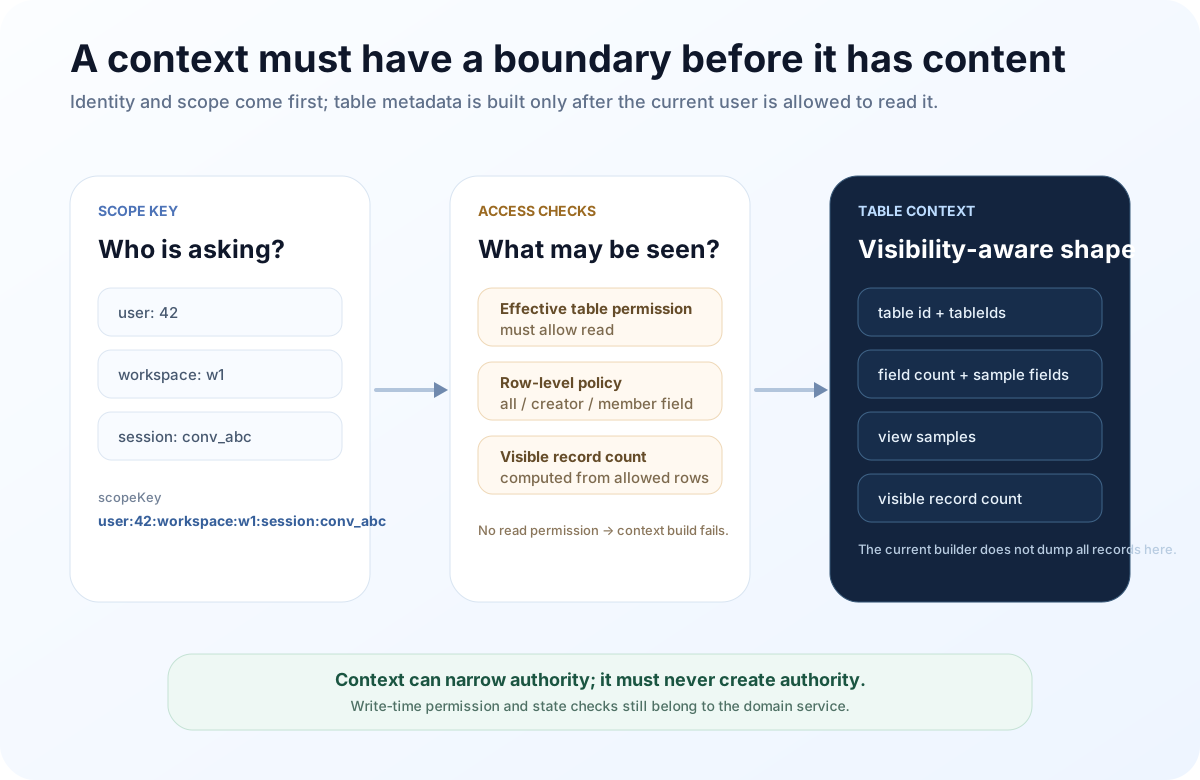
Table Context does not mean “send the whole table to the model”
This is an easy design trap.
When people say “let the AI understand the current table,” the first implementation idea is often to serialize every field and every record and append the result to the prompt.
QTable’s current Context Builder does not do that.
On the database backend, _build_table_context first resolves the current user’s effective permission for the target Table. If read access is not allowed, context construction fails.
If the table has row-level restrictions, the builder uses the Row Permission Policy to determine which record IDs are visible to the current user and derives a visibility-aware record count. Without that restriction, it can count the whole table.
The resulting Table Context currently carries things such as:
- the primary Table ID;
- all tableIds from the request;
- field count;
- up to 12 sampled fields with id / name / type;
- up to 6 sampled Views;
- record count within the user’s visible scope.
There is an important boundary here: the current Context Engine does not dump every Record into AgentContext.
I think that is the right direction.
The engine should tell the runtime where it is and what the business surface looks like. When an agent actually needs tasks, orders, or customer rows, a concrete Tool should query those records under the same domain permissions.
That avoids several problems.
The context does not grow linearly with every row in a large table.
Permission boundaries stay close to the data access operation instead of relying on a preassembled copy.
And Context does not become a second source of truth. The actual business facts stay in the Table / Record domain model.
There is also a current limitation worth stating plainly: a request can carry multiple tableIds, but the detailed field, View, and record-count context is currently centered on the first Table. The other IDs are retained in metadata.
So the current implementation should not be described as “full multi-table semantic understanding.” It is not there yet.
AgentContext is an inspectable snapshot, not a hidden system prompt
After aggregation, the builder produces an AgentContext.
The current object includes:
- User;
- Project;
- Workspace;
- Table;
- Task;
- Team;
- Organization;
- View;
- Session;
- Conversation;
- Workflow;
- Agent Stack;
- Context Summary;
- Context Window;
- generatedAt.
The engineering benefit is simple: context becomes inspectable.
If an agent makes a strange decision, the system can ask concrete questions:
Which Workspace did it believe it was in?
Which Table ID was active?
Which View did it receive?
What Conversation Summary was present?
Which Session produced the snapshot?
How much context budget was already used?
That is much easier to debug than “we probably put the right information somewhere in the system prompt.”
There is an important implementation detail here too.
Workspace, Table, View, and Conversation already have relatively concrete builder logic. Project, Task, Team, and Organization are currently shallower: mostly IDs plus metadata supplied by the caller rather than full domain entities resolved from their services.
So today’s AgentContext is best described as a stable context-contract skeleton whose sections have different levels of richness.
That is not a problem to hide. It is one of the reasons a structured contract is useful: missing depth is explicit and can be improved one domain at a time.
Conversation memory cannot be “send all history forever”
Long conversations create a very practical context problem.
After a project has been discussed for many turns, replaying every message verbatim becomes increasingly expensive, while older details do not all deserve the same weight.
QTable’s current strategy is deliberately modest.
The Conversation Builder uses tail-window + heuristic-summary:
- up to the most recent 20 messages are kept as recent turns;
- older messages move into a compressed section;
- the current implementation uses a handful of the latest compressed turns to build a heuristic summary;
- that summary and the recent turns become
ConversationContext; - the engine records original chars, compressed chars, kept-message count, and compressed-message count.
This is not a sophisticated “AI long-term memory” system.
That is precisely why it is easy to reason about.
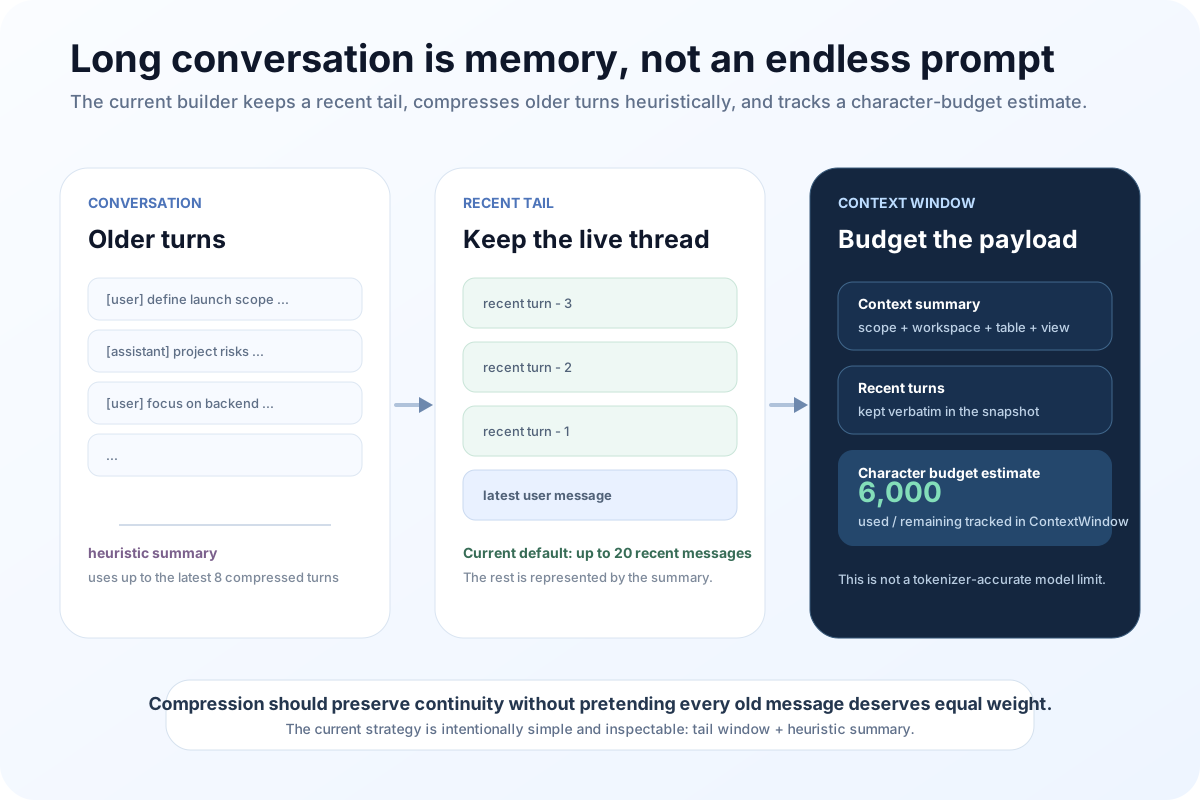
The current defaults set CONTEXT_MAX_CONVERSATION_MESSAGES to 20 and CONTEXT_COMPRESSION_CHAR_BUDGET to 6000.
I use the phrase “character budget” deliberately.
Today’s ContextWindow counts the characters in the summary plus recent turns. That is useful as a stable internal budget, but it is not equivalent to the true tokenizer cost for every model.
As QTable supports more models with different context windows, this should evolve toward provider- and model-aware token budgeting instead of pretending that 6,000 characters represent the same cost everywhere.
Session, cache, and snapshot solve three different problems
Rebuilding the whole context graph on every turn would add latency.
Relying only on cache would make the system difficult to inspect after the fact.
So the current repository has three layers with different jobs.
Redis Context Cache serves the hot path.
The current default snapshot TTL is 300 seconds. Requests with the same scope and coordinates can reuse an aggregated AgentContext.
Context Session preserves continuity across an interaction.
The current default session TTL is 86,400 seconds, or one day. A Session stores coordinates such as workspace, conversation, project, table, view, task, team, organization, workflow and agent, plus memory summary and the most recent context hash.
Context Snapshot preserves evidence of a build.
When a new context is actually built rather than returned from the hot cache, the repository can persist its summary, full snapshot, compression metadata, source and optional trace id.
These layers should not be conflated.
Cache is for speed.
Session is for continuity.
Snapshot is for answering: “what did the agent see at that moment?”
That is another reason I do not think of the Context Engine as prompt assembly.
A prompt usually disappears after inference. A Context Snapshot can become part of the system’s traceability story.
Context Injector carries the coordinates into the execution path
Building Context is only useful if downstream execution actually receives it.
QTable’s app/context_engine/injector.py is the bridge.
The injector writes structured information back into ToolRouterRequest and ToolContextState, including:
- sessionId;
- workspaceId;
- tableIds;
- conversationId;
- projectId;
- viewId;
- taskId;
- teamId;
- organizationId;
- workflow;
- agentStack;
- contextSummary;
- contextSnapshot.
It also exposes scope, summary highlights, and window information through variables, while adding the compact summary to the runtime notes.
That means the Router, Tool Adapter, and Skill Runtime do not each need their own private definition of “current Workspace.”
It moves QTable closer to one shared execution context rather than a collection of tools reading headers independently.
A Context Snapshot must never become write authority
This is where the fourth article connects directly to the third.
The Context Engine caches snapshots.
The current hot snapshot can live for 300 seconds.
During those five minutes, the real world can change:
- user permission changes;
- Table Schema changes;
- Row Permission changes;
- another actor edits a Record;
- Workspace membership changes.
A Context Snapshot can answer:
“What environment was this agent told it was operating in when it reasoned?”
It cannot answer:
“Is this write definitely authorized right now?”
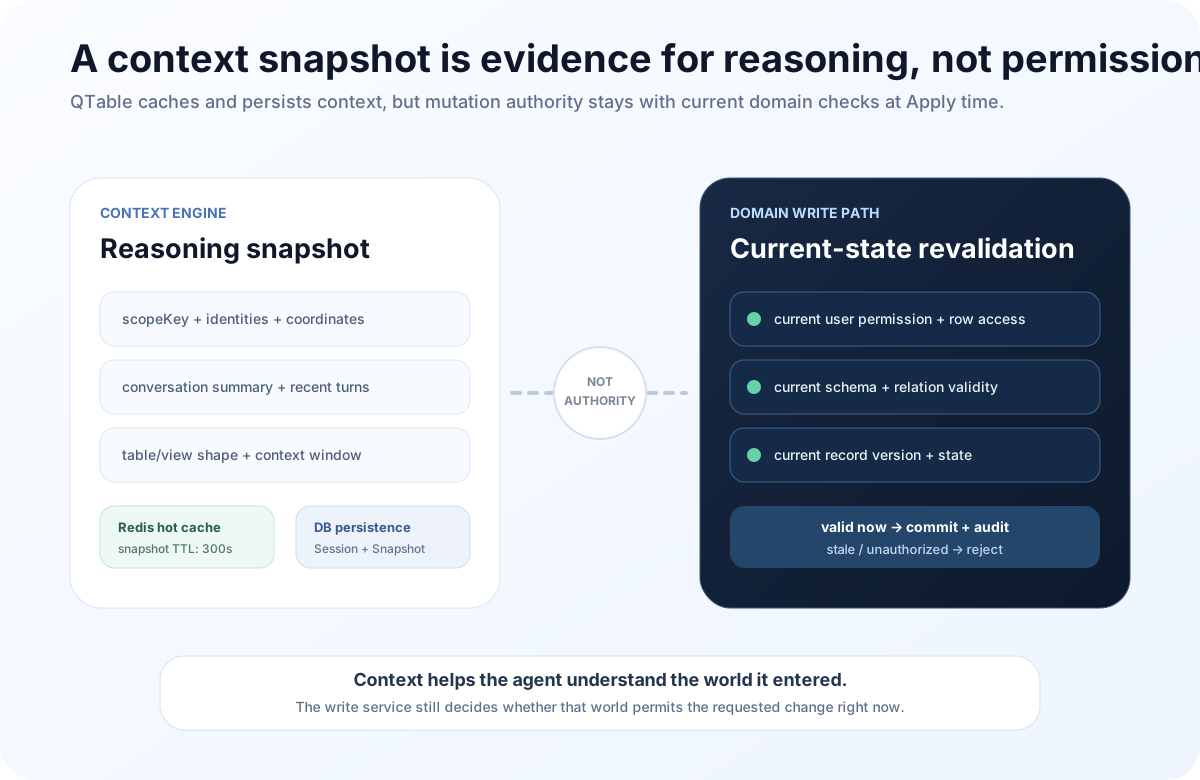
That is exactly why the Preview → Confirm → Apply path from the previous article revalidates Permission, Schema, Relation, and Record version during Apply.
If the write path trusted a cached Context Snapshot as authority, a five-minute cache could become a five-minute stale-permission window.
I prefer a sharper separation:
Context Engine answers: “Where am I, and what business environment am I reasoning about?”
Domain Service answers: “Is this specific change allowed in the current state?”
That boundary matters because one of the easiest architectural mistakes in agent systems is to collapse “what the model knows” and “what the model is allowed to do” into the same concept.
What the current Context Engine still does not solve
I do not want to describe this as a finished enterprise context platform.
It is not.
The current implementation gives QTable a useful skeleton, but several next steps are obvious.
First, Project / Task / Team / Organization context is still shallow.
Those sections currently depend mainly on IDs and caller-provided metadata. They should eventually be resolved through their own domain services, with the same permission discipline as Table context.
Second, multi-Table context needs to become richer.
Today the detailed Table Context focuses on the primary table. Cross-table agents will eventually need relation-aware context rather than just a list of table IDs.
Third, conversation compression remains heuristic.
It is simple and predictable, but it cannot reliably know that a constraint from fifty turns ago is still critical. Long-term memory will need stronger semantics without allowing a generated summary to silently replace source facts.
Fourth, cache invalidation is still mostly key-and-TTL based.
As Schema, permission, and business state become more dynamic, version- or event-driven invalidation would be safer than waiting for five minutes to pass.
Fifth, Context Window is currently a character estimate.
Real optimization across different providers will require tokenizer-aware budgeting, tool-call budgets, and probably stage-specific context allocation.
These are not reasons to discard the current design.
They are the engineering problems that become visible only after Context has an explicit place in the architecture.
A good Context Engine should feel invisible
Users do not care about ContextBuildInput, scopeKey, or ContextSnapshot.
They notice failures:
“I am already looking at this project. Why is the AI asking which one?”
“I have said three times that backend work comes first. Why did it forget?”
Or worse:
“Why did the AI see data I was not supposed to see?”
A good Context Engine should remove those moments without asking users to manage another AI feature.
People should keep working in Workspace, Table, View, and Conversation.
The Context Engine quietly converts that product state into business coordinates the agent can understand, while preserving scope and traceability.
The agent does not need to pretend it “remembers everything.”
It needs the right, explainable, user-scoped context at the beginning of each reasoning step.
That leads to the core idea behind this part of QTable:
Context is not more information for the model. It tells the model who it is acting for, where it is, what it is working on, and where the boundary of that understanding ends.
Once those coordinates are in place, Runtime can begin doing real work.
The next article will move into QTable’s Multi Tool Chain Runtime: when one request becomes a DAG of tools with dependencies, parallel branches, retries, failures, and rollback, how does an agent runtime avoid turning into an uncontrolled sequence of function calls?
QTable is open source
If the data model, AI workflow, or open-source engineering discussed here interests you, read the code, open an issue, or contribute directly.